  |
GoFiler Legato Script Reference
Legato v 1.6k Application v 6.6a
|
| Table of Contents | < < Previous | Next >> |
Chapter Eleven — SGML Functions (continued)
This is a preview XBRL Model feature — Contact support for additional information.
All functions and text are subject to revision and expansion.
xBRL-CSV
An xBRL-CSV instance consists of three groups of data:
JSON Meta Information — A properly structured JSON file. This is the file the XBRL Model used to open an xBRL-CSV Instance.
CSV Files — Zero or more associated CSV files (tables)
Taxonomy — One or more taxonomies that provide structure and meaning to the CSV data via the meta information in the JSON file.
The following is a simplified view of the structure:
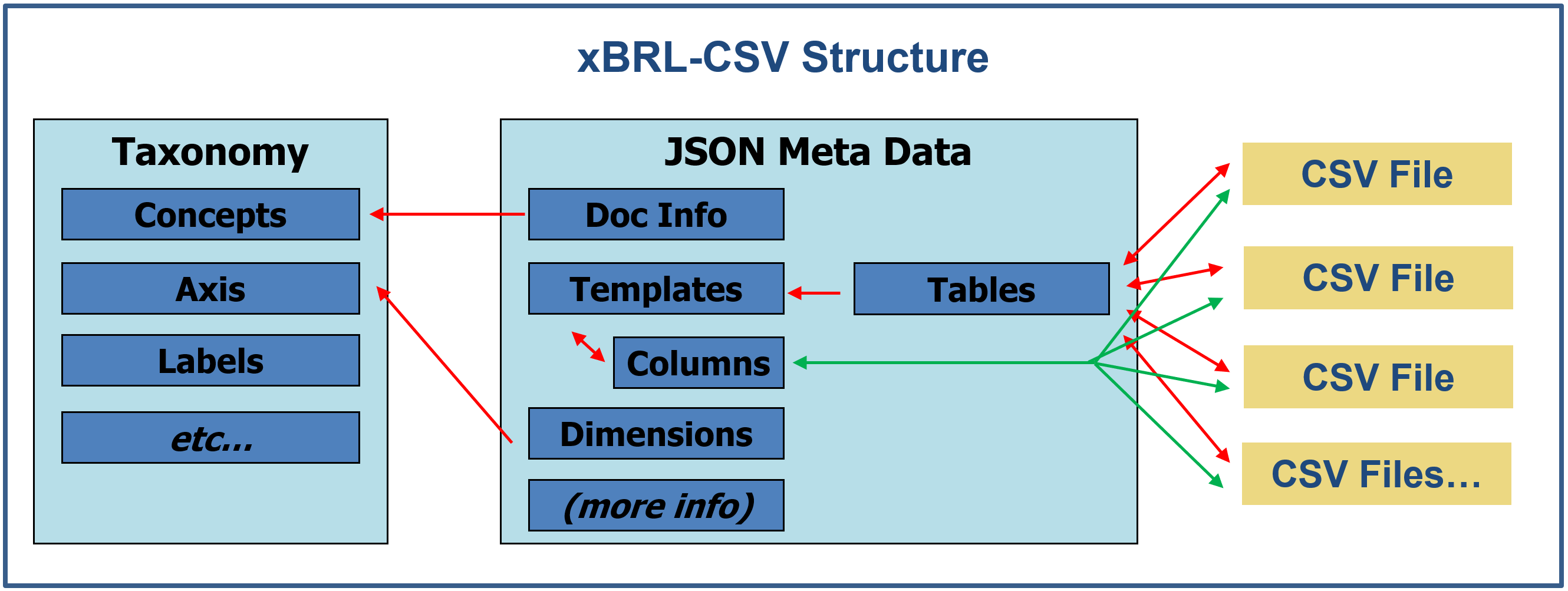
The JSON meta data defines the relationship between tables, CSV files and one or more taxonomy references. Tables reference CSV files by URL and, in turn, reference a Table Template (Templates above) by an identifier. Columns for a table are defined as part of the template which are associated to the Columns by an identifier (green lines).
Functions are provided to access data specific to xBRL-CSV file sets as managed by XBRL Model.
API calls that are specific to xBRL-CSV are designated with the xBRL-CSV tag.
Certain XBRL API functions, for example, those for defining XBRL contexts are not part of the xBRL-CSV.
The JSON meta information defines a report. The meta information contains information based on the XBRL Open Information Model combine with properties specific to xBRL-CSV. The meta data is not limited to a single JSON files, the XBRL Model will load the meta data from all the linked files.
The principal report level data objects include:
Namespaces — Defines the namespace for use within the meta data of the report. Like other namespace definitions the each object has a prefix and a unique namespace URL.
Taxonomy References — Zero or more taxonomy references. Presumably at least one meta file will have a taxonomy reference.
Link Types — TBD
Link Groups — TBD
Features — TBD
Table Templates — Defines the structure of Table objects. A template can used by zero or more Table objects.
Tables — A Table object connects CSV files via a URL with a Table Template to define structure. The first row of each CSV file must contain the Column ID. The associated CSV URL can be omitted, if required.
Dimensions — Report wide OIM core dimensions as defined below.
Parameters — TBD
Parameter URL — TBD
Certain properties apply to tables or columns. For example, decimals, which is analogous to the XML decimals property. xBRL-CSV does not support precision.
The structure of a table is defined by Table Template. A table template can contain:
Table Template Identifier — This is referenced zero or more times by table objects that in turn reference CSV data files.
Columns — A series of column objects, one for each defined column. Columns in a CSV file are connected to the column in a table template via a Column Identifier.
Decimals — Defines the default accuracy of a reported numeric fact value(s) for the entire table.
Dimensions — Table template wide core dimensions as defined below.
Within the CSV file, the first row will contain an ID referencing a column definition. Within the meta data, each column has the following basic characteristics as contained in the Table Template:
Column ID — This connects the CSV column to a template column via the table definition.
Decimals — Defines the default accuracy of a reported numeric fact value(s) for the column.
Dimensions — This contains the core and taxonomy dimensions. See the next section
Property Groups — TBD
Properties From — TBD
Comment — A boolean flag indicating the column is for comments. A comment column permits the inclusion of data in CSV data that is not part of the report model
Dimensions are based on the XBRL Open Information Model. Dimensions can apply to the report, table template or column. Each referenced dimension can contain the following core dimensions:
Concept — Primary concept as defined by the taxonomy.
Entity — An identifier specifying the reporting entity.
Period — An ISO-8601 date and optional time specifying a period of time (duration) or an instant.
Unit — A unit identifier defined within the taxonomy. This applies to numeric values.
Language — A BCP 47 language code optionally applied to textual values.
Taxonomy Defined Dimension — Zero or more QName:value pairs defining optional taxonomy defined or based dimensional data.
CSV files that are part of a report are joined to a table template using a table object. Each object can contain the following information:
URL — The location of the associated CSV data file. This may or may not be a fully qualified URL.
Template Identifier — The name of the template template to be used to define the tables structural contents.
Optional Flag — A flag that allows the CSV file to not be present to be valid.
Parameters — TBD
[additional ?]
Each CSV file and its data must adhere to certain basic requirements (details specified in xBRL-CSV: CSV representation of XBRL data 1.0).
Basic structure
Each CSV file is an instantiation of a table template as linked by one of the table objects via the URL as described above. Within the table object parameters, the data file can be marked as optional.
CSV files must follow the format defined in RFC-4180 but must be encoded as UTF-8 (file has a UTF header and may contain Unicode characters..
Cells in the first row must contain the column identifiers, as defined by the table template, columns object. These headers are tie each column to its dimensional meta data and characteristics,
Column Rules
First row, or column headers connect via an identifiers. These strings must follow OIM XBRL syntax restriction. For example, strings cannot contain whitespace and must not start with a number. For example, human-readable header such as “Country of Incorporation” isn't valid. It has must be reformatted to something like “country_of_incorporation”.
Because column names are the link between data and column metadata, they must be unambiguous and match exactly what's declared in the table template.
Cell Formatting
Fact values in each cell must match the data type and syntax for the specified concept. Numbers must be unformatted with no thousands separators or currency symbols. The decimal point is allowed.
A value like “2,560,561.43” or “$2,560,561.43” is not valid — only the plain numeric form. Numeric values may carry an inline decimals suffix, for example 1000d-3 to specify precision directly on the cell, following the value with no whitespace.
Special placeholder values are recognized in specific contexts:
#none — Explicit
no-value / infinite decimals
#empty — Empty string
#nil — Nil value
In addition, escaped literals ##/$$ where a real cell value happens to start with # or $.
Property Group Columns
Property group columns allow sets of decimal and dimension values (fact property groups) to be selected by an identifier, and applied to fact columns. If a cell in a property group column has a value then it will be the value of a key in the property groups object for the column.
The fact property group corresponding to the value will be applied to facts produced by any fact columns that reference the property group column via the Properties From parameter in the columns object as described above.
Supporting API functions break into the following groups:
XBRL Model Support — The XBRL Model uses the XBRL 2.1 conceptual model for many of the internal tables. xBRL-CSV is part of the OIM, there is a fair amount of cross over and many functions are shared or synthetically connected. See Section 11.21.14 xBRL-CSV and the XBRL Model API for additional information.
Table Templates — Functions as described in Section 11.21.15 Instance — Table Templates.
Columns — Functions as described in Section 11.21.16 Instance — Table Columns.
Tables — Functions as described in Section 11.21.17 Instance — Tables.
Platform Support
Page revised 2026-09-14
| Table of Contents | < < Previous | Next >> |
© 2012-2026 Novaworks, LLC. All rights reserved worldwide. Unauthorized use, duplication or transmission is prohibited by law. Portions of the software are protected by US Patents 10,095,672, 10,706,221 and 11,210,456. Novaworks, GoFiler™ and Legato™ are registered trademarks of Novaworks, LLC. EDGAR® is a federally registered trademark of the U.S. Securities and Exchange Commission. Novaworks is not affiliated with or approved by the U.S. Securities and Exchange Commission. All other trademarks are the property of their respective owners. Use of the features specified in this language are subject to terms, conditions and limitations of the Software License Agreement.